



Leaderboard
-
an2n
Medlem29Points17225Antal indlæg -
StudineMILF
Glædespige18Points3882Antal indlæg -

Iscenesat Virkelighed
Glædespige17Points1160Antal indlæg -
LineandYou
Glædespige16Points156Antal indlæg




Populære indlæg
Showing content with the highest reputation on 10/01/16 i Indlæg
-
13 points
-
9 pointsHvilken interesse skulle Ida have i at lyve? Dokumentaren handler hovedsagligt om gadepiger og escortpiger, de er selvsagt mere udsatte, hvilket der jo også bliver sagt, at procentdelen for overgreb hos disse er markant højere. PS. Jeg er heller ikke blevet hverken banket eller voldtaget, jeg har heller ingen intentioner om at fremmestille denne verden rosenrødt, for det er den ingenlunde.9 points
-
8 pointsVed godt det har været oppe og vende mange gange, men er sku pist . Som følge af efterfølgende, vælger jeg helt og droppe at tilbyde sted om lørdagen. De dejlige mænd booker tid og endda er jeg sød og give tid en time før jeg egentligt ville starte. Så sidder man her, den ene efter den anden aflyser 5 min. Før deres tid . Kan jo ikke nå og give tiden til en anden. Det er møg irreterende og spilde 4 timer, som jeg jo skal betale husleje for. Så kære mænd , tænk lidt over om i nu også er sikre på i kan den tid i booker. Beklager det sure opstød, men er bare så pist over at spille en dag som kunne have været brugt med familie eller andet og det så ovenikøbet koster en penge at nogle ikke gennemtænker hvad de foretager sig. God lørdag til alle8 points
-
7 pointsNej stop nu. Jeg kender ingen i denne brance som har været udsat for vold af deres gæster. Tror at det hovedsageligt en bestemt slags kvinde der i sin udstråling og væremåde kan være udsat for disse typer. Uerfarende/provokerende/ diva nykker mm er nok en af grundene. og de udenlandske piger der tæves af deres bagmænd eller gæster der føler jeg snydt. Jeg har ALDRIG været i en situation hvor jeg har følt mig truet eller bange. Så lad venligst være med at generallesere os all og tro ikke på alt du læser. Hyg7 points
-
6 pointsJeg tænker, der er også forskel på hvornår kvinden føler det som et overgreb? Jeg ville ingenlunde føle det som er overgreb at få presset en pik ned i halsen, eller at blive kaldt so, billig luder eller lign. sidstnævnte ville jeg allerhøjst finde grinagtigt. Mén naturligvis er der kvinder, som har det anderledes end mig.6 points
-
6 pointsMy God.. Tænk engang at jeg er blevet banket og voldtaget helt uden jeg har opdaget det .. Hvad sker der dog for verdenen nu om dage.? Når men spøg og sarkasme til side så har ALDRIG prøvet hverken det ene eller det andet.. Hmm.. Jeg ved ikke hvor de få deres oplysninger fra.. Jeg har altid undret mig over hvorfor alle de der udtalelser der kommer frem fra "vores side" af branchen kommer fra (undskyld mit franske) udslidte, meget gamle og brugte piger der måske har arbejdet i branchen i mange år nogle af dem nok også den gang i "de gamle dage" hvor branchen var mere hård tænker jeg.. Hvis man satte et kamera op inde i pigernes rum alle de steder jeg arbejder vil man tisse i bukserne af grin af alle de ting vi snakker om og joker med og generelt hygger med.. Hahaha.. Vi har det så skide sjovt og hyggeligt og kan også snakke om alvorlige ting og få afløb for vores følelser.. Blandt andet kender alle de piger jeg sidder med til mine underlige ekskærester og grineren oplevelser jeg har været igennem i mit liv og alt hvad der hører til at man har levet sit liv på godt og ondt.. Hehe.. Knus Jennifer6 points
-
5 pointsAnmeldelse af Zoya i Kbh N. (Redigeret da jeg glemte at skrive at det virkelig ER hende på billederne!) https://escortguide.dk/P/100-real-teenage-zoya--30403.html Jeg besluttede efter at Dede fra AL havde brændt mig af, at jeg altså ville besøge en alligevel i aften. Jeg skrev til Zoya, og hun svarede med det samme. Vi blev enige om 15 minutter inkl mega. Jeg ankom til adressen, som ligger meget diskret. Det er en almindelig lejlighed et stykke nede af en sidegade til Tagensvej. Som anvist ringede jeg hende op, og hun fortalte mig hvordan og hvorledes jeg kunne kom ind ad opgangsdøren. Asede op ad trappen, og blev taget imod af en lille, meget smuk kvinde, med store flotte silicone bryster. Hun var smilende, og fulgte mig ind gennem et temmelig stor OG rodet lejlighed. Jeg kunne høre de andre piger grine og tale i et af de andre værelser, men det gør jo ikke noget.. Vi kom ind, og jeg betalte hende det aftalte beløb, og hun strøg ud med pengene. Selve akten gik fint, og hun var villig og venlig, og suttede godt og tog det pænt i munden! Det var nok ikke mit livs oplevelse, men trods den rodede lejlighed, virkede der forholdsvist rent, og pigen kan jeg virkelig kun sige pæne ting om!! En anbefaling værd! God weekend til jer alle!5 points
-
4 pointsGanske kort. Jeg tog afsted for at møde hende her i morges: https://escortguide.dk/P/new-new-kathrine-in-sydhavn-29384.html Jeg var godt nok blevet advaret om, at det sikkert ikke var hende; men hun lovede på både sms og i telefonen, at det virkelig var hende på billederne. Nuvel, jeg dukkede op. En sød brunette åbnede døren og præsenterede sig som Kathrine - men desværre ikke hende fra billederne, så jeg gik igen. Har efterhånden oparbejdet nultolerance over for piger, der bruger falske billeder.4 points
-
4 pointsOg Kamera har noget at gøre med at vi alle har familie vi helst ikke vil møde hernede..4 points
-
4 pointsDet er vel et spørgsmål om smag og behag. Det er meget vigtig for mig at vide at den kvinde jeg skal være sammen med ikke gør det af nød eller pligt, fik jeg denne fornemmelse ville jeg tolke det som et overgreb og dermed "turn OFF" Derfor besøger jeg kun danske kvinder som jeg kan fornemme der har et helt almindeligt liv ved siden af som jeg også selv har. Som netop tilbyder sex fordi de selv har en lyst der skal stilles og de ekstra lommepenge selvfølgelig også var rare nok. Kommunikation er også en vigtig ting for mig både før under og efter, derfor er sprogbarrierre ikke smart. Ja og så har vi mange smukke danske Milf'er der er søde og frække, og som nyder at forkæle os mænd.4 points
-
4 pointsTager en dyb indånding eller flere, mens hun "kvinder" sig op og endnu en gang mobiliserer al den kvindelige charme der får os til at føle os som den eneste ene når hun kattesmidigt med et stort forventningsfuldt smil kommer ind ad døren til os der gamle nok til at være hendes far eller bedstefar4 points
-
3 pointsVar et smut på Nørrebro og besøge Bianca https://escortguide.dk/P/bianca-21-incall-outcall-real-pics-30394.html Aftale på sms om 15 min med økoblow og dansk. Faresignalerne var tændt for den erfarne bruger. Top-annonce på escortguide(hvilket bestemt ikke altid borger for høj kvalitet i oplevelsen), ung, mørk(rumæner?) Alligevel kunne jeg ikke stå for billederne som godt nok så noget retoucherede ud sine steder, men åbenbarede en dejlig ung kvinde med bløde former. Kunne være kønnere(var der ikke noget sært ved hendes ansigt?) Jeg blev mødt af en kvinde som bestemt er hende på billederne. Dog viste det sig af hun var lavet lidt bredere på billederne end hun faktisk er(thats a first), samt at ansigtet er gjort anderledes således at hun ikke kan genkendes. Det må være konlusionen, for synet der mødte mig var mere end godkendt. En sød, ung, køn og mega sprød stykke ungarsk kvinde i starten af tyverne. Jeg tror hun var ny og uerfaren for hun fumlede lidt med kondomet før samlejet, men det var mere end tilgivet for hun gav mig en af de blødeste, bedste og dejligste blowjob naturel jeg har fået i min tid. Da jeg spurgte om jeg måtte kigge lidt nærmere på hendes røv(jeg er ass man) smækkede hun straks stængerne over mig og spredte dem så vi endte i en 69 hvor jeg klart kunne have skudt den af i munden på hende. Det var ikke aftalen og jeg skulle også nå at kneppe hende. Startede med en ridetur, hvor jeg med udsynet til hendes små fine bryster, dejlige mave og bløde lår, blev gennemkneppet godt og engareret igennem. Jeg skulle intet lave andet end at bare ligge på ryggen og blive opslugt af hendes fisse...igen og igen og igen. Hun blev noget svedt til sidst og da hun ikke selv havde taget initativ til et skift(jeg tænkte at tiden for faen snart måtte være gået) nåede jeg at tage hende bagfra og til sidst i missonæren. Sengen var også god, kender i dem som springer godt så man kun skal trykke en gang og så kører pikken ind og ud som et stempel mod hendes underliv uden større anstrengelser(gode fjedre ) Jeg kan ikke anbefale hende til den store GFE oplevelse(noget som jeg ikke er til personligt), men som et af de hurtige 15 min er hun i den gode og øvre klasse. Enjoy fuck-brødre! Ps hvorfor står jeg som "ny bruger" når jeg har været medlem siden 2012?3 points
-
3 pointsHvad gør man når liderligheden melder sig en kedelig fredag aften og man kommer igennem Trekantsområdet (GG). Jeg kiggede div frække sider og faldt over en annonce fra Middelfart hvor Milfen Stella inviterede på frække oplevelser. Hun beskriver sig selv som en buttet Milf på 35 (alderen snyder, da hun ser yngre ud), og som elsker sex og masser af det. Hun tilbyder en masse forskellige ting indenfor det erotiske og hos hende er det tiden I tilbringer sammen som du betaler for og ikke ydelserne (helt klart at foretrække). Jeg lavede en aftale på en time og mødte spændt op til aftalen. I døren mødte mig en rigtig dejlig buttet Q med et rigtig frækt blik i øjnene. Nu skal jeg ikke gå helt i detaljer med vores samvær, men hun er en GP der klart nyder sexen og jeg glæder mig da til næste gang (for aftalen skal da klart gentages), hvor man har lært hende lidt mere at kende. Stella er den ene halvdel af 2Milfer, og næste gang skal jeg da nok også møde hendes veninde og lave en aftale med dem begge. Aftalen har givet følgende resultat: Pigen : 9,5 ud af 10 Stedet: 10 (ikke noget at sætte på stedet og der er mulighed for bad både før og efter. Sexen : stort 10 tal. Stella er klart en pige der elsker sex og det kan mærkes (selvom nogen nok vil påstå at det er rent skuespil).3 points
-
3 pointsDet blev jessica jeg besøgte, og det var bestemt en godt valg. Det er helt klart hende på billederne endog endnu lækkere uden tøj. 48kg tror det passer. En kanon lækker og sød pige. Sexen ja. Det gik sku hurtigt og det var bestemt hendes skyld, men på den gode måde. Havde gået hele aftenen og set frem til mødet, var blevet godt liderlig. Så da jeg så hende kunne jeg mærke på mig selv det ville gå galt. Allerede ved blowjob kunne jeg mærke at det var tæt på. Hjalp ikke tænke på elefanter eller grise, kunne jo se denne rigtig dejlige lille slanke pige sutte min ven. Spurgte om vi kunne flere stillinger, ja da siger hun(engelsk) så dummede jeg mig bad hende sætte sig oven på, dejlig fisse at komme ind i. Men skulle have valgt bagfra først, for det nåede jeg ikke ;-). Blev grebet af stemningen da hun sad der og stønnede og måtte fyrer den af oppe i hende. Gentagelse. meget stor chance Hun er bestemt et besøg værd kan slet ikke sammenlignes med de polske piger. Jessica you are an sex angel http://side6.dk/resultatside/?q=jessica3 points
-
3 pointsHej alle sammen. Jeg hørte udsendelsen i eftermiddags. Og må sige synes ikke de to Bente Kongerslev, og Pia Christensen. Generalisere overhovedet. De fortæller deres historie og oplevelser med at gå på gaden og være Escort piger. Men i kan hører den her. http://www.dr.dk/radio/ondemand/p1/p1-dokumentar-nar-kunden-vil-have-mere-end-sex#!/ Der bliver i starten af udsendelsen fortalt, at der er tilbagevendende beretninger om der sker, fornedringer (grim tale) Og ja det er jo ikke i orden heller, hvis det ikke er, aftalt på forhånd, Ja vold, og der forkommer voldtægter. Men det præcise tal kendes ikke. Og her tolker jeg, at det kan være de faktorer at Pigen ikke tør fortælle det pga. Bagmænd, fordi det er ikke godt for forretningen, tror nogen på pigen hvis hun anmelder vold eller voldtægt (politi, andre myndigheder). Og til sidst at Reden som har de allersvageste af pigerne 279 har der været igennem og 78 har fortalt om volds episoder og voldtægter og kun 7 blev anmeldt. Så det er ikke mange. Det er så tallene fra 2015. Men der nævnes at i 2016 var der også mange tilfælde. Og i langt de fleste episoder, altså vold, forbedringer og voldtægter bliver mellem gæsten og pigen. Dvs. Hun får ingen hjælp af nogen slags af det grunde jeg har skrevet ovenfor. Og ja de danske piger er ikke bange for politiet som der i høj grad er for udenlandske piger som overhovedet ikke skal, have noget med politi og myndigheder at gøre. De ting må ikke lukkes ned eller man må ikke lukke øjnene for det sker. Men mærkeligt at det er underbelyst. i 2007 skrev SFI at 60 % har været udsat for vold og 30% voldtaget. Det er jo store tal og man må ikke dehumanisere det at det sker. Jeg er da glad for der er piger det ikke sker for. Men bliver da også vred at der er mænd der elsker den der umenneskeliggørelse, fornedring, og magten over at nu skal de lige vise sig overfor pigerne. Det er klart der vil komme en polariseret debat imellem de forskellige parter altså for og imod en kriminalisering af prostitution. Jeg mener faktisk det er en god ting at anmelde hvis nogen kommer ud for vold eller voldtægt. Før kan man jo ikke bringe det til falds. Og vi kan vel også godt blive, enige om, at havde pigerne ikke en kølle, peberspray, en hund, eller en mand i rummet ved siden af eller i bilen (escort) det må de jo have af en grund Sikkerhed. Og det er ganske fint de har det. Jeg har intet at frygte. Og ser jo ingen af delene når man opfører sig ordentligt. Men at vi snakker så meget om at enten kriminalisere eller af kriminalisere branchen gør ikke noget godt. Men jeg mener det bedste er, at der kommer løsningsforslag på. Hvordan vi kan hjælpe branchen. Til at åbne op for at der sker grufulde ting imod dem, Og det skal ikke bare ties ihjel. I 2012, har SFI (social forsknings instituttet) lavet den sidste rapport om vold i branchen. Og det er da ikke godt nyt. 41% af de adspurgte havde prøvet at der var udøvet vold i mod dem. 33% af escort pigerne. Har prøvet vold, og fornedringer. Men super program jeg hørte. Og faktisk, handler den om, at være mere imødekommende. Så branchen kan blive bedre for pigerne i alle delene i branchen. Ingen skal finde sig i vold på deres arbejde uanset hvad og hvor man arbejder. Ha en god lørdag aften. KK3 points
-
3 pointsVi tager vores forbehold netop fordi der er grimme historier det er der da.. Jeg ville f.eks med mine 150 cm og 43 kilo have svært ved at smide en fuldvoksen mand ud eller af hvis jeg fandt ham ubehagelig (hvilket ikke er sket endnu) derfor har jeg en tele der klart er bedre til den opgave end jeg er plus hun jo også er der for at gøre rent og vaske sengetøj osv. osv.. Jeg lever ikke på en lyserød sky og har også set min del af ubehagelige mænd dog ikke nogen hvor jeg arbejder men som ganske køn pige så oplever man tit tilnærmelser på barer og andet og når man som mig godt ved de findes derude så det da klart man ønsker sikkerhed.. Især når man er i så "sårbar" en situation (med situation menes der nøgne og alene med mænd der nogle gange er dobbelt så store som os) som vi nu engang er i.. Jeg elsker mit arbejde.. Og jeg nyder hver eneste vagt jeg har faktisk.. Vi har en fest.. Jeg har heldigvis siddet med nogle skønne piger.. Og mødt nogle skide søde og sjove gæster.. Selvfølgelig har jeg da også mødt dem jeg ikke klikkede med og så har vi udført hvad gæsten har betalt for så gæsten også er gået derfra med en god oplevelse og følt at service niveauet var godt og så har det været det.. Nogle gange har de følt det var så godt at de er kommet tilbage og andre gange har det bare været den ene gang de har været der.. That's the name of the game.. Men jeg har ved gud (total politisk ukorrekt I know) aldrig oplevet en ubehagelig gæst endnu.. Og så kan i sidde og snakke nok så meget omkring at vi selvfølgelig har en grund til at fortælle som vi gør.. Men i beder om vores mening i sagen og så giver jeg min helt ærlige mening..3 points
-
3 pointsSad og læste denne streng og forarges over disse generaliseringer. Har dog selv haft en lidt underlig oplevelse. Besøgte en GP i en Airbnb-lejlighed. Hun var en udenlandsk, selvstændig pige (ingen pimp) og havde været i landet flere gange. Nuvel, jeg kom ind til hende og hun så ud fuldstændig som sidste gang, meget smuk og indbydende i sit minimale kostume, flirtende og smilende som altid. Men, da vi havde aftalt, hvad der skulle ske og hun havde fået sine penge, trak jeg hende blidt ind til mig for at kramme og kysse (som vi plejede)...pludselig brast hun i gråd. Det er en situation, jeg ikke magter til fulde, men jeg fik hende sat ned og spurgt lidt ind til situationen, om jeg skulle gå igen? næh, det skulle jeg ikke, der havde blot været en "crazy guest" og jeg skulle bare holde lidt om hendes skulder, så ville det gå over. Hun sad lidt og kom til hægterne, kyssede mig og sagde undskyld. Her gik jeg nok lidt galt, hun opfordrede mig til at blive og "make love" med hende og det gjorde jeg så. Måske ikke så pænt, men bagefter, da jeg skulle gå, sagde hun, at nu havde hun heldigvis glemt "crazy guest" igen. Hvad "crazy guest" havde gjort, fandt jeg ikke ud af, men han havde i hvert fald overtrådt nogle af hendes grænser. Hun fortsatte med at komme til landet og jeg fik besøgt hende en gang mere. Jeg mærkede ikke nogen forskel, så hun havde sikkert glemt min trøstende skulder. Jeg tror ikke, alle glædespiger bliver udsat for vold eller voldtægt, jeg ved ikke, om de er mere udsatte end så mange andre, men en ting er sikker. De er oftere sammen med mænd, hvor hormonspejlet er hævet og herved risikerer de oftere at være sammen med mænd med en lavere voldstærskel. Selv kunne jeg aldrig finde på at bruge vold overfor en kvinde jeg enten lige har haft sex med eller skal til at have sex med. For mig er sex en handling så langt fra vold som noget kan være. Men jeg tænker alligevel ikke altid klart når liderligheden tager fat. Venligst (fredsommelige) OT3 points
-
3 pointsOverhovedet ikke men det er ikke sandt det du læser. måske nogen er tilhænger af et forbud, har du tænkt så langt. Jeg har Absolu ingen grund til at pynte på sandheden.3 points
-
3 pointsSpørg Bananen?? Jeg har præsteret fem besøg hos NIna (eller var det mon 6?). Ubestridt? Hvem i den her verden er ubestridt? Jeg kan godt lide Ninas præstationer og synes som Arne at hun er en aldeles dejlig dame. Lige præcis det epitet er perfekt: "En aldeles dejlig dame". Kan ikke siges bedre. Men ... jeg kender jo ikke May, endnu.... mfl. Dog har jeg besøgt en eller anden kvinde der er blevet totalt hyldet herinde, der ikke sagde mig ret meget. Så det der med ubestridt...? Jeg har på følelsen at Nina er en dame der vinder på at man lærer hende at kende, og sådan har jeg det generelt med thaipigerne. Det bliver altså bedre og bedre ... hvis det ikke er helt beskidt fra start. Dagsform og kemi er jo noget der ophører at have den helt store betydning når man kender kvinden godt, men til gengæld er altafgørende i begyndelsen. Men Nina er altså .... en aldeles dejlig dame.3 points
-
2 pointsHvor skal man starte.... Efter at have kørt lidt rundt for og finde et sted (først SIAM ude ved Harald Jensens plads men synes altid det er svært at se hvornår de er åben og hvor de er lukket, og der står de har lukket lørdag så buuhoo) Efter det kørte jeg op til den der ligger på hjørnet på Jordbrovej da der var lys i deres skilt men der var ikke nogen der kom og åbnet døren (og den ældre herre som kom som jeg kørte væk kom heller ikke ind) Nå, tænkte lad os prøve Aroma igen da der kunne jo være sket noget nyt (og bedre) siden jeg var der sidste gang som var et års tid siden. Kom ind og sagde at jeg gerne vil have 1 times massage men fik at vide de kun havde 30 minutter, og om jeg kun vil have massage eller om jeg også skulle have andet (starter altid bare med massagen også tager vi det ekstra når vi kommer der til) Først brugte hun 5 minutter på at få musikken til at spille på deres anlæg som hun aldrig fik til at virke. Massagen startede på benene og det var meget en dejlig fornemmelse da det ikke var så hårdt igen.Efter lidt vil hun lige pludseligt hente et håndklæde til og lægge over også måtte jeg vente igen. Efter hun kom tilbage fik jeg snakkede lidt med hende om hvorfor det kun kunne blive 30 minutter var at der var folk som havde bestilt tid også ændret historien til at det jo var frokost tid så hun skulle jo spise. Nå men om på ryggen også håndklædet over kalorius også lidt massage på ben igen hvor efter hun spurgte om jeg ville have ekstra og hun kunne kun tilbyde hånd, og man måtte ikke rører og ikke noget med at smide tøjet. Jeg takkede ja og hun gik bare hurtig og helt mekanisk i gang med små porno støn som bare ikke virkede. Efter små 5 minutter kunne jeg godt mærke at det her bare ikke virkede og bad hende stoppe. Tror hun blev lidt fornærmet da hun spurgte hvad der var galt om det skulle være endnu mere hurtig eller mere langsom. Så 30 minutter senere, et mislykket HJ, 500kr fattiger og her troede jeg ikke at det simpelthen at det kunne blive værre end mit sidste besøg men det kunne det. Pigen snakkede dog rigtig fint dansk og der var en anden pige på stedet der heller vil kigge i hendes telefon og en meget maskulin ladyboy der var i gang med at gøre sig selv klar. Folk må selv beslutte om de vil tage der over, men jeg sætter aldrig mine ben der igen lige meget hvad og vil heller prøve et andet sted fordi Aroma bliver bare ikke bedre.2 points
-
Servicemeddelelse: Baleri er tilbage https://www.escortguide.dk/P/baleri-deep-throat-queen-glostrup-28078.html Helt klart den bedste prof deepthroat-udøver jeg har mødt og derudover en virkelig sød pige2 points
-
2 pointsHi guys Here is a short review from a new user (both on Eroguide and in the GP world). I will try to write more in my future reviews, this is just to share some of the stuff I experienced. I (alone) was in Pattaya for 3 weeks in August and had a great experience. I lived in a hotel on Soi 8 and not much to say about the hotel, it was cheap and OK rooms etc. + no hassel bringing girls to the room. This was my first trip to Pattaya and also my first "thorough" dive into the GP world so was great but also a bit scary and I want to send my thanks to this forum, it really helped me with my thinking around a lot of GP things and it also helped me in what to expect, how to approach certain things etc.. This is the main reason as well I decided to be active in this forum and share my experiences (the support, help etc. I myself got from using the forum) and I hope more people share their experiences and continue to do so. Here is a short overview over the experiences I had. I decided beforehand to do something every 2-3 days and I stuck to that "plan" and I had approximately 10 experiences in total. PS I used condoms etc. and played it safe at ALL times (BJ without and I consider that safe enough / a risk I am willing to take): - I visited Bliss Lounge (blowjob bar) 3 times. 2 BJ´s (different occasions) from 1 girl that was around 18-20 years old I would say and 1 BJ from 2 girls (1 occasion) and both girls were around 18-20 years old. Nice girls (they had some ugly ones as well so be aware) and did a good job. - I visited Devil´s Den 1 time and got a "Nuru gel" massage from "Luck" and I never tried a nuru massage before and was great (it was just like in the nuru massage porn clips you see online). - I visited Honey soapy 2 times and got soapy massages from 2 different girls (different occasions) and was good, the nuru massage was better though. A note, I had 1 girl in her thirtees maybe and was highly professional and did a great job and next I had younger girl maybe around 20 years old and she was the most expensive girl in the place and was a real looker (looked like a model) and she was a bad experience unfortunately. I could barely touch her, BJ with condom etc. etc.. I did my thang and got off anyways and didn´t complain or something like that. This info here is just a word or warning, the most beautiful girls is not always the best performance wise. - I visited Soi 6 1 time and stopped at a random bar and took a nice girl to the room upstairs. I wanted to try Soi 6 and was great and I meant to go back but never did as other things came up. Soi 6 is fucking crazy and overwhelming to say the least :). - I went to a Soi 7 bar and took a nice girl around 20 years old home to my hotel and she spent the night and was a good experience and was actually my first "longtime" (the massage girl below was the night after this bargirl girl) and I see the attraction of longtime as well, you get more time with some cuddling etc, and stuff and I enjoyed it and will definitely do it again. - I got a HJ from a massage girl. I also got that same massage girl up to my room on another occasion and was full package and she spent the night. - I did something I never tried before and was a bit wild and crazy and that is what Pattaya is about so kind of "fit" the place :). I sat in my hotel lobby one day and was a bit horny and out from the elevator a good looking ladyboy came. I have always wanted to try a ladyboy/shemale but never really dared and I was at this point in time not ready to go to a ladyboy bar. I seized the opportunity and waived the ladyboy over and asked her if she would come with me to my room ( : ) ) which she did :). I only got a BJ as I wasn´t really ready for the rest :(, will see if I try that next time or maybe on some occasion in DK. One of the best BJ´s I have gotten so the saying that ladyboys know their stuff might be accurate. Pattaya is fucking awesome and really has a lot to offer and I didn´t go to Thailand just for the GP but also for the rest of great things like climate, food, scenery, massage, prices of all things etc. etc.. All in all an awesome holiday and will definitely go back at some point.2 points
-
2 pointsHej på er. Efter en veckas ferie fra the adult business var den svenske kattjägaren back on track. Jag skriver på engelsk som vanligt. Denne anmeldelse kan bli lång... As people who read my anmeldelser know by know, I love threesomes and I love Mansiongirls. I usually try to see things positive but I was not glad when Mansion moved to Valby this new years. But as they got back to Rödövre it is as good as ever. The line up nowadays is visually hotter than ever. The service might have gone down a little in general but I believe it is because they now have more young girls who do not have the same experience. But I usually have a blast at the mansion. There are still a number of top service piger there regularly. For example the great Debbie White, Lisa and also Ginger, who is there right now. http://www.mansiongirls-cph.com Today I met Ginger and Sabrina. 30 minutes with the german style extra services I love. Heaven. Sabrina I have met before. Her look is, if you like me love the pornmodel look, basically second to none. But there are many superhot piger. I mean for example Mira at Seduction. It does not get better, anywhere... Sabrina is superhot visually. The action is not as her looks. Like people at eroguide knows from earlier anmeldelser, I have my 3 list which you have seen before. 1. Social skills 2 Hot visual appearence 3 Hot action Sabrina is a 10 of 10 in the second category. So we use the german term Opti here. But that is fine at times. I was supersatisfied with Sabrina today. But do not expect the ultimate gfe. Ginger on the other hand provided super service. Wow. Very nice. All in. So my hat of to her. And Ginger speaks good english which helps out. Over all I had a blast. One of the hottest piger I have ever been with visually and one good looking pige who were very very good both socially and action wise. Another day in the heaven of sin. I will write an interesting connection just after this. So to sum it up. No, it was not the ultimate threesome, like Lisa and Viki almost provides. But as I love being with two hot girls in sweaty action, yes I loved it. And pigerne seemed good and it was another naughty Saturday party of three at Mansion girls. Tack för mig! / hälsningar A2 points
-
2 pointsPludselig sad hun der lige ved siden af mig på en fransk fortovscafe.
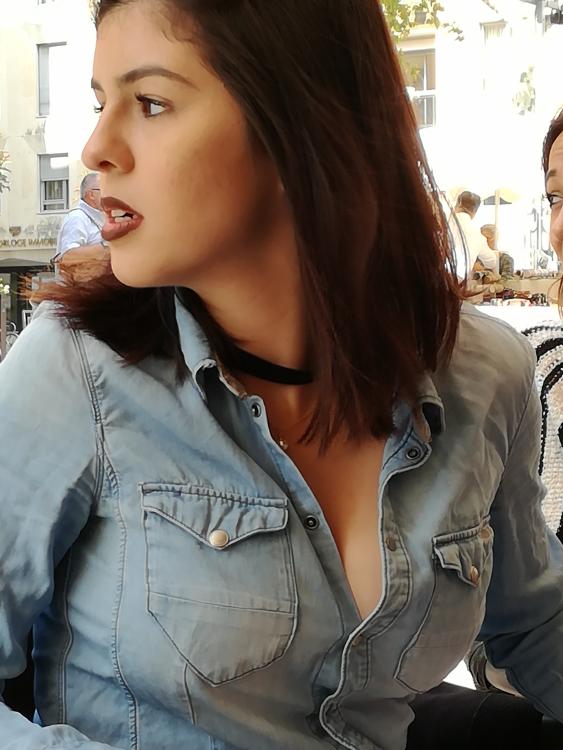 2 points
 -
2 pointsAltså hvorfor er der så brug for en tele pige ? Hvorfor er der kamera på nogle klinikker ? Piger fra klinikken overfor, som lige banker på døren hvis det lyder lidt for vildt bag døren PD piger som sender en sms til en eller anden, når min besøgstid er ved at være ovre. Hvorfor giver garvede piger så råd videre til nye piger ? Jeg siger ikke at alt og alle voldtages på hver eneste vagt, men de tager sig da deres forbehold må man sige...og der er vel ikke KUN for at skærme sig fra mænd som lugter af sved ?! Jeg har heldigvis aldrig besøgt en dansk pige som har sagt at hun er blevet voldtaget, men der er da blevet sagt, at det ikke er alle mænd som er lige venlige,...der bliver presset så de må gøre deres bedste for at sige fra. Jeg har dog besøgt en thai kvinde som havde oplevet noget forfærdeligt, det var dog sket i Thailand.2 points
-
2 points
-
2 pointsØkologisk Nutella er ikke godt at massere med, men smurt ud over en lækker kvinde krop er det totalt mums at slikke i sig. (også uøkologisk kan bruges med nydelse).2 points
-
2 pointsUd fra den smule jeg har læst om emnet, mener jeg at kunne se et mønster af dybere liggende psykiske dysfunktioner hos mange af disse voldsmænd. Man hører jo, hvorledes de nedgør kvinden, fordi hun får dem til at gøre noget urent, beskidt...noget de ikke selv synes om. Jeg vil ikke på nogen måde forsvare den slags handlinger, er man klar over den slags dysfunktioner, så må man undgå at bringe sig i situationer, hvor dysfunktionen kommer til udtryk. Ligesom en tørlagt alkoholiker også skal undgå sprutten. Det kan jo ikke lægges os andre, der nyder og beundrer GP'erne, til last, at nogle kunder er psykisk dysfunktionelle. Jeg har stor medfølelse med de stakkels piger det går ud over, og idioterne skal straffes på linje med alle andre voldsforbrydere. Venligst OT (der har stor respekt for vore dejlige GP'er)2 points
-
2 points
-
2 pointsKeder mig. Flere afbrændere efter hinanden så smider et par nye pic. Fra i dag

 2 points
 -
2 points2 pointsJeg klikkede på programmet fordi jeg troede emnet var et andet. At jeg ikke gad at høre programmet er nu mere fordi jeg har problemer nok selv i øjeblikket. At disse 2 kvinder har haft en dårlig tilværelse er mega trist - man kan kun skamme sig på sit køns vegne, når mænd ikke fatter at behandle kvinder som mennesker - også når der er betalt penge.2 points2 pointsNu er EG et offentligt site så hvordan kan du forvente at folk ikke blander sig? Må sige at læse dine svar er utroligt underholdende2 points2 points2 points2 pointsMotivet betyder mere end kameraet. Jøsses hvor er du dejlig studinemilf. Godnat og tak for i aften2 points2 pointsHar været hos Kat. Midt i massage afbrydelse da der kom en anden kunde i butikken. Åbenbart en stamkunde. Lå med bar røv og tænkte: Hvad fanden sker der her? Ind kom en anden kvinde - bevares meget sød men ældre og løs i kødet - ikke fedt når man har set frem til at finde ud af hvad Kat egentlig kan. På vejen ud siger Kat, der har gjort den anden færdig på rekordfart: "Så er det min tur næste gang". Nej, det tror jeg nu ikke der bliver noget af. Hos Anni på Mariagervej ved jeg at jeg får en god behandling hver gang, hvilket jeg til enhver tid vil vælge fremover.2 points2 points2 pointsDet er en af de annoncer, hvor billederne er stjålet fra en ungarsk escortside. Efter den side har fået vandmærker på billederne stjæler de thumbnails (som er uden vandmærke) og lægger dem forstørret op - så de er lette at genkende på pixelerede billeder. Lige denne piges billeder kan dog sjovt nok også findes i bedre opløsning uden vandmærke her: http://rosszlanyok.hu/rosszlanyok.php?pid=szexpartner-data&id=31501 Bemærk: i den ungarske annonce er det massage med happy end - i den danske sex uden kondom. Hun har været aktiv på den ungarske annonce i dag og står som åben for business i Budapest ... Disse annoncer har samme træk: https://escortguide.dk/P/happy-noemi--30260.html https://escortguide.dk/P/new-jessika--30385.html https://escortguide.dk/P/veronika-very-hot-end-sexy-30259.html https://escortguide.dk/P/new-jenny-hot-end-very-good--30241.html2 points2 points2 pointsArh, det er nu så meget sagt. Hvis din intention er at skade Emma, bør du vide at din strategi virker modsat - med din måde at svare på giver du hendes udlægning mere troværdighed. Hvis du prøver på at nedgøre andre i en slags selvforsvar, tjah - så kan man sige lidt det samme. Lyt hellere til dig selv:2 points2 points2 points2 pointsJeg har personligt haft nogle enestående oplevelser med Nina. Synes hun er en aldeles dejlig dame. Men det er jo også en subjektiv vurdering, så det er lidt svært. Det handler jo meget om dagsform og kemi. Men jeg erindrer ikke lige at Nina på noget tidspunkt skulle have fået en dårlig anmeldelse, så helt skidt er det vel ikke Ellers så spørg Bananen, han må jo mindst være VIP kunde hos Nina, med alle de besøg han har præsteret2 points2 pointsSynes selv, at kvindekroppen er naturens ypperste skabelsesværk, den behøver faktisk ingen udsmykning....hvilket disse kvinder reelt er eksempler på. De ville også være smukke uden implanteret blæk. Sætter dog pris på en smuk og smagfuld make-up, den skal bare kunne fjernes og ændres efter situation og humør. Det kan denne slags udsmykninger jo desværre ikke. Men spændende og flotte ser de da ud. Venligst OT2 points2 pointsgid man var på fyn, eller i kbh.. så ville jeg meget gerne komme forbi.. men klart i venter, der er jo vild med dans i aften..2 points2 pointsmå nok sige at jeg går mest efter danske piger, for det at kunne samtale under den relativt korte tid man er sammen er temmelig vigtig for mig.. har prøvet at sku ha en halv time på platengelsk, og den fiser lidt af når man ligger og tænker "forstod hun nu helt hvad jeg mente, og omvendt" og man kigger hende i øjnene og man kan ligesom fornemme hun tænker det samme..2 points2 pointsDet er skam også dejlige udenlandske piger men min opfattelse er dog at mange af de udenlandske piger udelukkende gør det for pengene, hvor de danske piger også nyder det de laver. Og så har vi da de skønneste piger i hele verden her i Danmark2 points2 points2 pointsThis leaderboard is set to København/GMT+02:00







.thumb.jpg.3539b494ca2a32f4e8de8b9092dd1461.jpg)


















.jpg.d4e9ba1e933fce0c3dcb7a3864b6ec19.thumb.jpg.824ff433c49ad8da228be1c7fe1cef9d.jpg)



Denne hjemmeside bruger cookies
Vi bruger cookies til at huske dine indstillinger og forbedre din oplevelse på siden. Klik på "Acceptér cookies" for at give dit samtykke. Du kan til enhver tid trække dit samtykke tilbage eller ændre dine cookieindstillinger her.
Account
Navigation
Søg
Configure browser push notifications
Chrome (Android)
- Tap the lock icon next to the address bar.
- Tap Permissions → Notifications.
- Adjust your preference.
Chrome (Desktop)
- Click the padlock icon in the address bar.
- Select Site settings.
- Find Notifications and adjust your preference.
Safari (iOS 16.4+)
- Ensure the site is installed via Add to Home Screen.
- Open Settings App → Notifications.
- Find your app name and adjust your preference.
Safari (macOS)
- Go to Safari → Preferences.
- Click the Websites tab.
- Select Notifications in the sidebar.
- Find this website and adjust your preference.
Edge (Android)
- Tap the lock icon next to the address bar.
- Tap Permissions.
- Find Notifications and adjust your preference.
Edge (Desktop)
- Click the padlock icon in the address bar.
- Click Permissions for this site.
- Find Notifications and adjust your preference.
Firefox (Android)
- Go to Settings → Site permissions.
- Tap Notifications.
- Find this site in the list and adjust your preference.
Firefox (Desktop)
- Open Firefox Settings.
- Search for Notifications.
- Find this site in the list and adjust your preference.